Home/Office Services For Every Need
Hello Triad Area residents! I’m Rick Rice, your trusted local General Contractor, and I’m here to transform your home/office maintenance worries into a seamless, stress-free experience. With over a decade of dedicated service, I’ve been a reliable source for Renovations, Home Maintenance, Bath and Kitchens, and Interior Painting.
Call Us: 1-336-607-4076
Your Home, Our Expertise
No Job Too Small, No Task Too Big: Your Local Handyman Service Since 2012!
Renovation
Revitalize your space with thoughtful renovations, making practical and stylish improvements to enhance its overall appeal.
Damage Repairs
Revitalize your space with meticulous damage repairs, addressing issues practically and with resilience.
Odd Jobs
Make regular stuff amazing with our flexible odd jobs service, giving you practical solutions that are also special.
Painting
Add color and positive vibes to your space with our exceptional painting service, ensuring both functionality and a pleasing aesthetic.
Electrical
Illuminate your space with our electrical expertise, addressing issues practically and prioritizing safety at all times.
Carpentry
Get your plumbing back on track with our expert help, bringing practical and long-lasting solutions.
Get A Free Consultation & Estimate
Unlock Your Home's Potential:
Ready to elevate your living spaces? Take the first step towards a transformed home with our complimentary consultation and estimate service. Let's discuss your vision, explore the possibilities, and provide you with a personalized plan tailored to your needs. Your dream home is just a conversation away—contact us now to get started!
Featured Projects
Explore a showcase of our proudest accomplishments in the world of home/office improvement. Each project tells a unique story of transformation, blending creativity with meticulous craftsmanship. From stunning renovations to seamless repairs, our featured projects embody the essence of quality, turning visions into reality. Be inspired by the possibilities, and let us bring your next dream project to life!
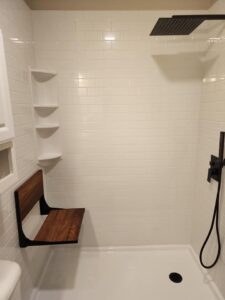

Elevate your living spaces with our transformative Renovation services. From conceptualization to completion, 4CSI turns your visions into reality, creating a home that reflects your unique style and functionality. Experience the art of renovation with us!
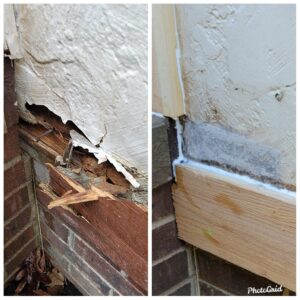
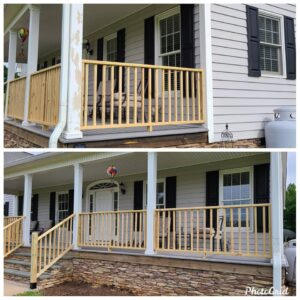
When life leaves its mark, we're here to undo it. Our Damage Repair services are crafted to restore and renew, ensuring your home remains a sanctuary of comfort. Trust 4 CSI for meticulous repairs that breathe new life into your spaces.
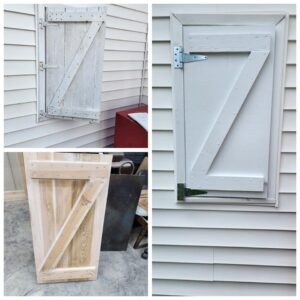
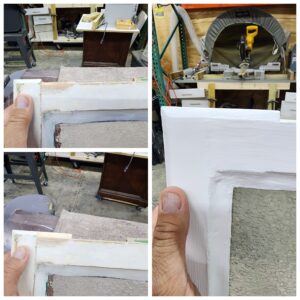
No task is too peculiar for us! 4CSI specializes in turning the quirky into the quintessential. From odd jobs to unique challenges, we bring precision and expertise to every task, ensuring your space reflects your individuality.


Transform your living canvas with our expert Painting services. 4CSI brings a spectrum of colors to your walls, creating an ambiance that resonates with your style. Let us paint a picture of comfort, elegance, and personality in every room.

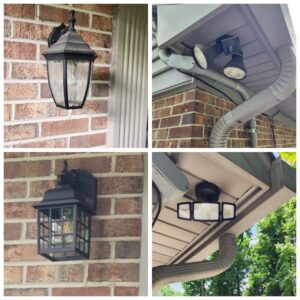
Trust 4CSI to bring light to your space with our Electrical services. From fixture replacements to seamless installations, our expertise ensures not just illumination but a harmonious blend of safety and style in every corner of your home.

Keep the heart of your home beating smoothly with our Plumbing services. 4CSI ensures reliable solutions, addressing issues promptly to maintain the flow of comfort and functionality in your living spaces. Trust us for hassle-free plumbing and a home that runs seamlessly.
Freequently Asked Questions
What types of projects do you specialize in?
We specialize in a wide range of projects, including renovations, home maintenance, bath and shower installations, pressure washing, interior painting, bulky item removal, electrical work, odd jobs, plumbing, and more. No task is too small for us!
How long does a typical project take to complete?
The timeline for each project varies based on its scope and complexity. During the consultation, we'll provide you with a realistic timeline, keeping you informed every step of the way.
Are you licensed and insured?
Yes, we are fully licensed and insured. Our team is committed to delivering professional and reliable services, and our insurance provides added peace of mind for our clients.
What sets 4CSI apart from others?
Our commitment to quality workmanship, personalized service, and treating your home as if it were our own sets us apart. With over a decade of experience, we prioritize your satisfaction and ensure that every project is completed to the highest standards.
How long does a typical project take to complete?
The timeline for each project varies based on its scope and complexity. During the consultation, we'll provide you with a realistic timeline, keeping you informed every step of the way.
What COVID-19 safety measures do you have in place?
We prioritize the health and safety of our clients and team. We adhere to all recommended COVID-19 safety protocols, including wearing masks, practicing social distancing, and maintaining a clean and sanitized work environment.
Do you provide a warranty for your work?
Yes, we stand behind the quality of our work. We offer warranties for our services, ensuring that you can trust the durability and longevity of the improvements made to your home.
How do I pay for your services?
We accept various payment methods, including cash, checks, and electronic payments. Payment details will be discussed and agreed upon during the consultation process.
Can you assist with emergency repairs?
While we primarily schedule appointments, we understand that emergencies can happen. Contact us, and we'll do our best to accommodate urgent repairs and address your needs promptly.
Have a differint Question?
Testimonials
Why Choose US
Personalized Service
I understand that every home is unique, and so are your needs. I work closely with you to prioritize tasks, ensuring that your home gets the attention it deserves.
Master Of All Trades
From electrical fixes to plumbing replacements, odd jobs to renovations, I handle it all with finesse. No job is too small; I am your go-to expert for a myriad of home improvement needs.
Quality You Can Trust
With a commitment to excellence, I provide top-notch workmanship that ensures your home is not just repaired but elevated. Your satisfaction is my priority, and I treat your home as if it were my own.
We are Available Monday - Thursdays
Thank you for considering 4CSI as your trusted partner in crafting exceptional living spaces. Let us turn your visions into reality, one project at a time. Your dream home awaits—reach out to us today, and let the journey to elevated living begin!